
Classic Paddle Rally Revival
What players say
Classic Paddle Rally Revival succeeds by honoring the original arcade concept while refining the experience for modern players. The clean visual design keeps the focus squarely on the ball and paddle, and the smooth animations make each hit feel satisfying. The AI opponent offers a good challenge without being frustrating, thanks to adjustable difficulty levels. The lack of extra modes or online play keeps things simple, which is exactly what this type of game needs. It is a well-executed, no-fuss arcade title that respects your time and reflexes.
How to play
Core Duel Mechanics
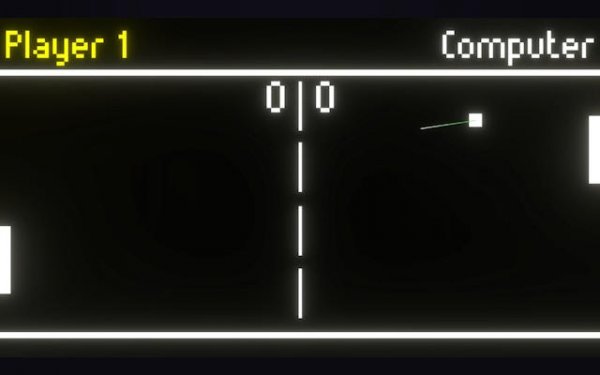
At its heart, this game is a one-on-one contest of precision and anticipation. You control a vertical paddle on your side of the playing field, moving it up or down to intercept a small ball. The ball travels in a straight line until it contacts a paddle or the top/bottom boundary, which changes its trajectory. Each successful return keeps the rally alive, while a miss awards a point to the opponent. The match continues until one player reaches the predetermined score. The simplicity of the rules makes it easy to pick up, but mastering the timing and angle control requires practice.
Visual & Audio Presentation
The game adopts a clean, minimalist aesthetic with a dark background and brightly colored paddle and ball. Smooth animations ensure the ball’s movement feels fluid and natural. Subtle visual cues, such as a brief trail behind the ball or a slight screen shake on a point scored, provide feedback without cluttering the screen. The sound design is similarly restrained, with a soft thud on paddle contact and a gentle tone when a point is earned. This approach keeps the player focused on the action rather than distracting effects.
AI Opponent Behavior
The computer-controlled opponent is designed to provide a consistent challenge. It tracks the ball’s position and moves its paddle to intercept, but it is not perfect. The AI’s reaction speed and accuracy scale with the difficulty level, which can be adjusted before starting a match. At lower settings, the opponent may miss occasionally, giving new players a chance to learn. At higher settings, the AI becomes more precise and faster, demanding sharper reflexes and better strategic placement of shots. This scalability ensures the game remains engaging for both beginners and experienced players.
Match Flow & Scoring
Each match begins with a serve from the center. The ball launches toward one side, and the receiving player must return it. Rallies can be short or extended, depending on the players’ skill. The ball’s speed increases slightly with each consecutive hit within a rally, adding pressure to maintain control. Points are scored only when the opponent fails to return the ball. The first player to reach 11 points wins the match, with a two-point lead required if the score ties at 10-10. This scoring system keeps matches brisk and competitive.
Accessibility & Platform
Being a browser-based game, it requires no installation or registration. It runs on any modern web browser with HTML5 support, making it accessible on desktop computers, laptops, and some tablets. The controls are keyboard-based, typically using the arrow keys or specific keys for up and down movement. The responsive input ensures that paddle movements feel immediate, which is crucial for a game that relies on quick reactions. This low barrier to entry allows anyone with an internet connection to start playing within seconds.









Comments
Sign in to comment
You must be logged in before posting a review or rating.
No account? Create one
No comments yet. Be the first to comment!